Givebacks
- 3.5
- Rating
- 100.00K
- Installs
- Free
- Price

 Analysis by App-foxy
I like shopping apps that make a familiar routine feel more useful, and Givebacks takes that idea in a community-focused direction. Instead of treating a purchase as the end of the process, it is designed to connect everyday shopping with support for a child’s school. That makes it especially interesting for parents, relatives, teachers, and anyone who wants ordinary spending to contribute to a school community without adding another major task to the calendar.
My overall impression is positive but practical rather than enthusiastic. Givebacks is free to use, aimed at everyone, and belongs in the shopping category. It comes from Givebacks, Inc., and its central appeal is easy to understand: you shop through the service, and the activity is intended to help support a school. The important question is not whether the idea sounds good—it does—but whether the complete journey from choosing a school to completing a purchase feels clear enough to repeat.
The strongest part of Givebacks is the connection between a normal buying decision and a local cause. The trade-off is that this kind of service depends on a chain of steps working properly. If the school connection, shopping route, or final credit is unclear, the good intention can become extra effort. I would recommend it to people who already want to support a school and are willing to build one more habit into shopping, while people looking for the widest possible retail comparison may prefer a conventional shopping app.
You May Also Like

 AccuWeather: Weather Radar
AccuWeather Review: A Quick, Clear Forecast for Everyday Decisions
For everyday plans, the best forecast is the one you can understand quickly. AccuWeather makes rain timing, radar, and local conditions easy to act on, with a few trade-offs.

 Hill Climb Racing
Why Hill Climb Racing Still Turns Crashes Into One More Run
A tiny car, a bumpy hill and one more upgrade: Hill Climb Racing keeps resurfacing because its simple chaos makes every near-miss feel personal.

 AliExpress - Shopping App
AliExpress Makes Global Shopping Feel Personal, but Shoppers Bear the Risk
AliExpress turns a global marketplace into a pocket-sized discovery engine. Its reach is useful, its shopping loop compelling, and its trade-offs easy to miss.

 Lords Mobile: Kingdom Wars
Lords Mobile Is a Kingdom-Building Routine, Not a Quick Match
A case-by-case verdict on the building, battles, device demands, and social commitments that make Lords Mobile rewarding for some players and exhausting for others.

 PDF Scanner app - TapScanner
TapScanner Makes Paperwork Easier to Capture, Check, and Share
TapScanner makes scanning with a phone feel less like a rescue operation and more like a dependable step in getting work done. Its capture tools are useful, though not flawless.

 Block Blast!
 Shows How Much a Puzzle Game Can Leave Out
A quiet grid game shows why puzzle players increasingly value instant clarity, repeatable skill and low-pressure play—and where the genre still needs to catch up.
More From Our News Desk
View All News


From everyday shopping to school support
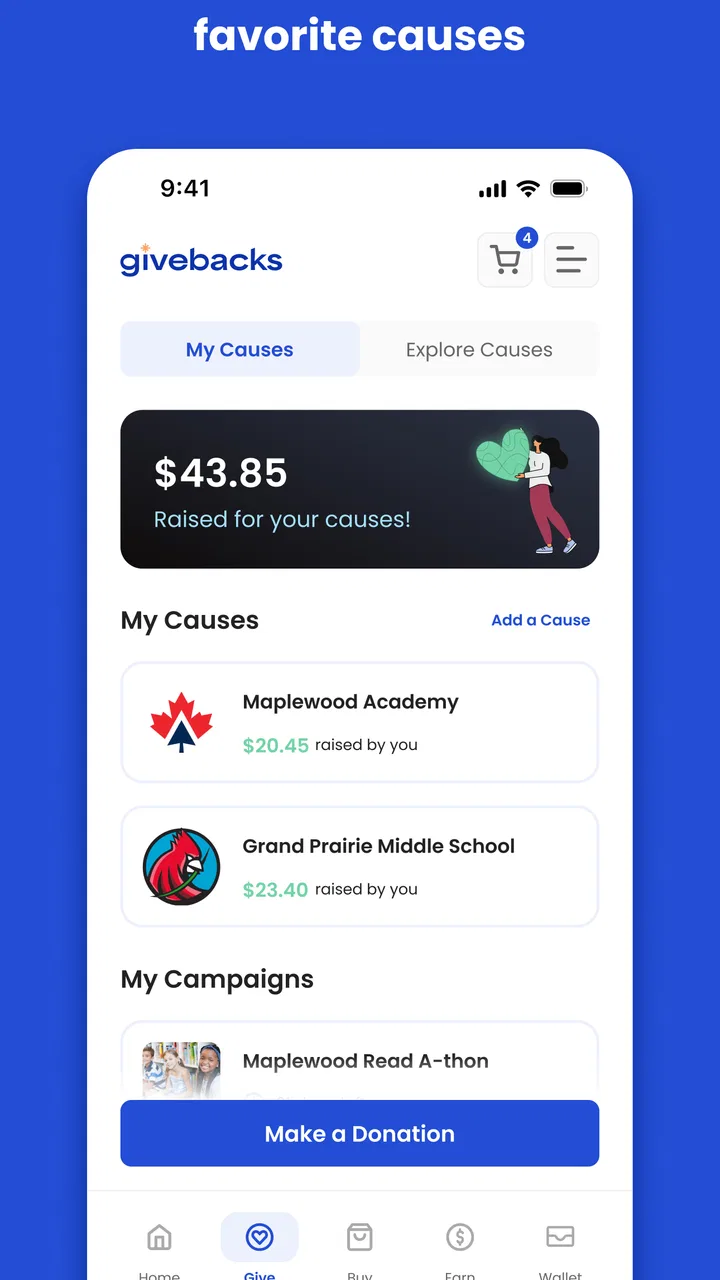
I find the most useful way to judge Givebacks is to look beyond its shopping purpose and consider the pace of the whole routine: opening the app, choosing a school, and then continuing to a purchase. That extra step is likely to feel smoothest when I’m planning ahead rather than rushing through checkout. Next, I’ll look at what happens when a purchase takes more attention and how to keep the process manageable.
Starting with a real need, not another app to browse
The most realistic starting point is a family that is already planning to buy something. It might be a household item, a school-related purchase, or a routine order that would happen anyway. In that situation, Givebacks has a clear advantage over asking someone to make a separate donation: the user begins with an existing shopping need rather than a new financial commitment.
That distinction matters. A donation app asks me to stop, decide how much to give, and complete a dedicated contribution. Givebacks fits more naturally into a purchase workflow. I can think about what I need first, then use the platform as the bridge between that intention and school support. For busy parents, this is more realistic than relying on occasional fundraising messages or remembering a separate campaign.
The app is also a better fit when the school connection is personal. If my child attends the school, or if I am already involved with its community, the reason to return is obvious. The service is less compelling for someone who wants a general-purpose shopping tool with no interest in directing support toward a particular school or community.
Setting the destination before making the purchase
The first important task is choosing the school or school community that should benefit. I would treat this as the most important setup step, not a minor detail. Before shopping, I would check that the selected destination is the one I actually intend to support. A moment spent verifying that choice can prevent the most frustrating outcome: completing a purchase and later wondering whether the benefit went to the right place.
This is one of the less obvious habits that makes the app more useful. I would not open it only after I have already started shopping elsewhere. I would begin with Givebacks, identify the school, and then continue through the available shopping path. That order keeps the purpose visible and reduces the chance that the purchase becomes disconnected from the intended school.
For families with more than one child, this step deserves extra attention. A household may care about multiple schools, and switching between them casually could create confusion. I would decide which school the current purchase is meant to support before moving forward, rather than treating the selection as something to adjust at the end.
Moving from intention to action
Once the destination is selected, the useful part of the experience is turning that choice into a shopping action. The app’s value is not simply displaying a cause; it has to help me carry the decision through to an actual purchase. I would look for a clear route from the school-support choice into the shopping experience and avoid opening unrelated shopping routes in parallel until I understand how the transaction is being attributed.
This is where Givebacks differs from a normal retailer app. A retailer usually optimizes for product discovery, saved carts, delivery details, and payment. Givebacks adds a community outcome to the journey. That extra purpose is valuable, but it also means I need to pay attention to the transition between the app and the shopping activity. The more deliberate I am at this point, the easier it is to understand what the purchase is supposed to accomplish.
My practical advice is to use the app when I have enough time to complete the process in one sitting. It is not the kind of workflow I would begin while rushing through a checkout line or switching between several shopping apps. The school-support step is the reason to use Givebacks, so it should not be treated as an afterthought.
Keeping the handoff understandable
The handoff between Givebacks and the shopping activity is the part I would watch most closely. In a conventional store app, the app and the transaction are usually the same environment. Here, the user needs to understand when the support selection is active and when the shopping portion has begun. That mental handoff is easy to overlook because the purchase itself may feel familiar.
I would use a simple routine: select the school, start the shopping journey from that state, complete the purchase without unnecessarily restarting the process, and keep the confirmation available afterward. This is not glamorous advice, but it is exactly the kind of routine that protects the intended outcome. If I close the app, change routes, or start again from a different place, I may no longer feel certain that the purchase is connected correctly.
Another useful habit is separating the role of Givebacks from the role of the retailer. Givebacks is the community-support layer; the retailer remains responsible for the product, order, payment, and delivery experience. If something goes wrong with an item or shipment, I would first identify whether the problem belongs to the shopping provider or to the Givebacks connection. That distinction can save time when seeking help.
What the result means in daily life
The result I want from Givebacks is not a flashy shopping experience. It is the quiet satisfaction of completing a purchase I needed while helping a school I care about. That makes the app most valuable as a repeatable habit. One isolated use may feel modest, but a household that remembers to use the service for appropriate purchases can turn routine activity into ongoing support.
A realistic example would be a parent preparing for a new school term. The family already needs supplies and household items. Instead of opening a familiar retailer directly, the parent starts in Givebacks, confirms the intended school, follows the shopping route, and completes the order. The parent then keeps the order confirmation and returns to the app for a future purchase. Nothing about the shopping list changes, but the starting point changes the possible community outcome.
This workflow also works for relatives. A grandparent who does not participate in school events every week may still want to help. Using Givebacks for a planned purchase can be easier than understanding a complicated fundraiser. The same applies to friends of a family who want a low-effort way to contribute. The app turns support into a choice made at the beginning of shopping rather than a separate event.
For a teacher or school volunteer, the value is different. The app can be part of a broader conversation about how families support the school, but I would avoid presenting it as a magic replacement for every fundraising method. Its usefulness depends on people actually using the shopping workflow. Clear instructions from the school community would likely matter more than simply telling families to download it.
Where the flow can break
The first point of friction is user attention. Givebacks asks me to remember a new starting point for shopping. If I habitually open a retailer app or use a saved browser shortcut, I may forget to begin with Givebacks. That is a genuine limitation because the service depends on behavior change, even when the purchase itself is routine.
The second issue is uncertainty during the handoff. Any time a shopping service and a support service meet, I want clear confirmation that the intended school is still connected. If that relationship is not obvious while I shop, I may hesitate to rely on the process for important purchases. A community-support app should make confidence part of the experience, not require users to reconstruct what happened later.
There is also a trade-off between purpose and shopping flexibility. A standard shopping app may offer a smoother product-search experience, stronger order tools, or a more familiar checkout. Givebacks is not the better choice simply because it supports a school. If I am comparing products carefully, tracking an order, or resolving a delivery issue, the retailer’s own app may remain the more practical tool. I would use Givebacks for the support connection and the retailer’s tools for retailer-specific tasks.
Another limitation is that the app may not suit impulse shopping. If I need something immediately, I am less likely to pause and establish the support path first. The service makes more sense for planned purchases, recurring household needs, and shopping occasions where I can follow the process carefully. That is an important exception: the app is not automatically useful for every transaction just because the transaction is online.
Who should use it and who should skip it
I would recommend Givebacks to a parent who wants a simple way to include school support in ordinary shopping. It is also worth considering for relatives, school supporters, and community-minded shoppers who already have purchases to make and prefer directing their effort toward a specific educational community.
I would be more cautious recommending it to someone who wants a shopping app first and a cause-related feature second. If the main goal is the fastest product search, the broadest retailer tools, or a highly polished order-management system, a conventional shopping app may be a better match. Givebacks earns its place through its purpose, not by trying to replace every feature of a major retailer.
I would also skip it for purchases where the workflow cannot be checked carefully. When I am in a hurry, making a complicated purchase, or already deep into another checkout, the possible benefit may not justify the extra uncertainty. In those cases, completing the purchase reliably is more important than forcing the Givebacks route.
Compatibility, cost, and what to expect
Givebacks is free, which removes the most obvious barrier to trying it. It is rated for everyone, so its intended audience is broad rather than restricted to adults or a narrow age group. The app was released on March 25, 2022, and the current version is 3.6.7. It works on Android seven point zero and later, making it accessible to many older Android devices as well as newer phones.
Its reach is also meaningful: the app has passed one hundred thousand installs. At the same time, its average rating is three point five from around one hundred eighteen ratings, with roughly forty-eight written reviews. I read that combination as a reason to approach it with realistic expectations. There is enough adoption to show that the concept has found an audience, but the rating suggests that individual experiences may vary and that the workflow deserves attention rather than blind trust.
The developer is Givebacks, Inc., and the app remains free to install. I appreciate that the basic decision to try the service does not require paying an entry fee. Still, free does not mean frictionless. The real cost is the small amount of attention needed to start shopping in the right place and maintain the intended school connection.
My practical verdict after following the workflow
Givebacks is a focused shopping app with a clear social purpose. I would not describe it as a universal replacement for retailer apps, and I would not use it for every purchase automatically. Its best role is as a deliberate first step before planned shopping, especially when the user already knows which school they want to support.
The workflow is straightforward in principle: begin with a real purchase, choose the school, enter the shopping journey from that choice, complete the order, and keep the result in mind for future purchases. The handoffs are where I would stay alert. Confirming the destination early, avoiding unnecessary restarts, and distinguishing Givebacks support from retailer order service are the three habits that make the experience easier to trust.
My recommendation is therefore conditional but genuine. If supporting a school is meaningful to you and you can build one extra step into planned shopping, Givebacks is worth trying. If you only want the fastest or most feature-rich shopping experience, use the retailer’s own tools instead. Givebacks works best when its community purpose is the reason you open it, not when you expect it to behave exactly like a conventional store.
After using it, I see the app as a small behavioral change with a potentially useful outcome. It does not remove every point of uncertainty, and it asks users to be intentional about the handoff from school selection to shopping. But for families and supporters who are already spending money on ordinary needs, that extra starting step can make shopping feel connected to something beyond the cart.
I would keep it installed if I regularly shop for a household and have a school I want to support. I would open it before planned purchases, verify the selected school, complete the shopping path without improvising, and rely on the retailer’s own tools for order-specific questions. Used that way, Givebacks feels less like another app demanding attention and more like a practical reminder to direct an existing habit toward a school community.
FAQs for Givebacks
01What is Givebacks and how does the app work?
Givebacks is a fundraising and community-support platform designed to help organizations, schools, teams, and causes raise money through everyday shopping and participating offers. After creating an account, users can typically select or support a participating organization, browse available deals or campaigns, and complete eligible purchases or activities. A portion of qualifying transactions is then directed back to the chosen cause, subject to the app’s terms.
02Is Givebacks free to download and use?
The Givebacks app is generally free to download, and creating a user account should not require a standard subscription fee. However, some offers, fundraising campaigns, or purchases made through participating merchants may have their own prices, conditions, exclusions, or processing rules. Before completing an activity, review the displayed offer details carefully so you understand what qualifies and whether any additional costs apply.
03How do I support a school, team, nonprofit, or other organization with Givebacks?
After signing in, you can usually search for a participating organization or access an invitation, campaign, or support link provided by that group. Once your connection is established, eligible purchases or activities made through the app can be associated with the selected cause. It is important to confirm that the correct organization is selected and to follow any instructions about activation, receipts, promo codes, or purchase tracking.
04How does Givebacks track purchases and fundraising contributions?
Givebacks may use tracked links, participating merchant integrations, campaign codes, receipts, or other verification methods to determine whether a transaction qualifies. Tracking is not always immediate, and some purchases may be excluded because of returns, cancellations, unsupported products, payment methods, or failure to begin the transaction through the required app link. Keep receipts and check your activity history if a contribution does not appear as expected.
05What should I know about privacy, permissions, and account security on Givebacks?
Givebacks may request information such as your name, email address, organization affiliation, transaction details, or notification permissions to operate its fundraising features. Before registering, review the app’s privacy policy and the permissions requested on your device. Use a strong, unique password, avoid sharing login details, and contact official support if you notice an unfamiliar account change, transaction, or organization connection.
Pros
- Simple way to discover and support participating local businesses
- Clear visibility into available rewards and promotional offers
- Useful for users who regularly shop at partner merchants
- Can make everyday purchases feel more rewarding
- Convenient access to offers from a mobile device
Cons
- Benefits depend heavily on the number of participating businesses nearby
- Some rewards may include restrictions or expiration dates
- Offer availability can change without much notice
- Requires sharing personal details to create or manage an account
- Less useful if you rarely visit participating merchants

Givebacks
Gallery